Call Flow
The Call Flow node triggers and executes another workflow. It supports passing parameters and receiving return values.
Overview
Save reusable sub-logic (such as login, data cleaning) as an independent workflow file and call it from the main workflow via this node. When called, it blocks and waits for the sub-workflow to finish executing, then continues downstream nodes after receiving the return value.
The called workflow must be started via Manual Execute — otherwise, it won't appear in the candidate list.
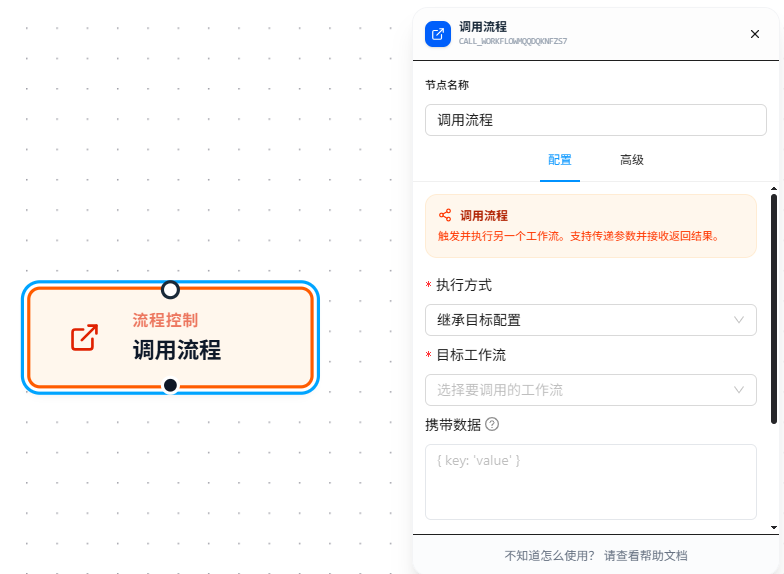
Usage
After dragging in the node, configure the following parameters:
Target Workflow
Select the workflow to call from the dropdown. The dropdown automatically filters to workflows containing a "Manual Execute" node — only this entry point can be called externally.
Carry Data
JSON parameters passed to the sub-workflow. The sub-workflow receives them via its trigger's "Receive Data" field.
Supports {{variableName}} references — variables are replaced with actual values before JSON parsing, so you can embed upstream variables anywhere in the JSON:
{
  "url": "{{targetUrl}}",
  "orderId": "{{orderId}}",
  "config": {
    "timeout": 5000,
    "retry": {{retryCount}}
  }
}
Assuming upstream retryCount = 3, the actual JSON passed to the sub-workflow is:
{
  "url": "https://shop.example.com/order/12345",
  "orderId": "12345",
  "config": {
    "timeout": 5000,
    "retry": 3
  }
}
Note:
{{retryCount}}is not quoted, so it's replaced with the number3. If written as"{{retryCount}}", it would be replaced with the string"3". Decide whether to quote based on the type the sub-workflow expects.
The data format is JSON, supporting relaxed syntax like trailing commas, single quotes, and comments.
Execution Mode
Controls which browser page the called workflow executes on. Three modes are available:
- Inherit Target Config (default): Uses the execution mode configured in the called workflow's Manual Execute trigger.
- Open New Tab: Opens a new tab and navigates to the specified URL, then executes the workflow on that page. Requires a target URL, supports
{{variableName}}references. - Specify Tab (TabId): Executes the workflow on a specified already-opened tab. Requires the target tab's TabId, supports
{{variableName}}references. Mainly used in combination with variables.
Output Variable
The variable name to store the sub-workflow's return value. Data returned by the sub-workflow via the Return node is stored in this variable, available to downstream nodes in the main workflow via {{variableName.field}}.
Main workflow — referencing the return value after the call:
Assuming Output Variable is set to "result" and the sub-workflow returns:
{
  "status": "success",
  "amount": 99.00,
  "items": ["A", "B"]
}

Main workflow downstream references:
{{result.status}}   → "success"
{{result.amount}}   → 99.00
{{result.items}}    → ["A", "B"]
After Execution
Controls what happens after the called workflow completes:
- No Action (default): No extra operation. Downstream nodes in the main workflow continue execution.
- Close Calling Workflow Page: Closes the page where the called workflow was executing. Useful when you open a new tab for the sub-workflow and want it auto-closed after completion.
Complete Example
Sub-workflow (the called side):
- Entry is "Manual Execute" with Receive Data set to
data - The sub-workflow accesses the main workflow's parameters via
{{data.url}},{{data.orderId}} - After execution, the Return node returns the result:
{
  "status": "success",
  "amount": "99.00"
}
Main workflow (the calling side):
- "Call Flow" node: Target Workflow set to the sub-workflow, Carry Data filled with JSON containing variables, Output Variable set to
result - After the call completes, reference the return value via
{{result.status}},{{result.amount}} - If Output Variable is left empty, the return value is discarded and the sub-workflow only executes as a side effect
Parameter Reference
| Parameter | Type | Default | Description |
|---|---|---|---|
| Target Workflow | Dropdown | — | Required. Only lists workflows containing Manual Execute |
| Carry Data | JSON | — | Parameters passed to the sub-workflow. Supports {{variableName}} references; variables are replaced before JSON parsing |
| Execution Mode | Dropdown | Inherit Target Config | Controls which page the sub-workflow executes on. Options: Inherit Target Config, Open New Tab (URL required), Specify Tab (TabId required) |
| Output Variable | Text | — | Variable name to store the return value. Leave empty to discard |
| After Execution | Dropdown | No Action | Action after the sub-workflow completes. Options: No Action, Close Calling Workflow Page |
FAQ
Target workflow doesn't appear in the dropdown
Symptom: The target workflow has been saved, but doesn't show in the dropdown.
Cause: The target workflow is missing a Manual Execute node.
Solution: Add a "Manual Execute" node to the target workflow and save it.
Sub-workflow doesn't receive the passed parameters
Symptom: JSON was filled in Carry Data, but the sub-workflow's variables are empty.
Cause: The sub-workflow trigger's "Receive Data" field is empty, or the field name doesn't match the variable name referenced inside the sub-workflow.
Solution: Confirm the sub-workflow trigger's "Receive Data" is filled in (e.g., data), and the sub-workflow references it via {{data.fieldName}}.